
FBR Digital Invoicing Software in Pakistan
Create tax invoices, validate them with FBR and submit them in real time through PRAL, with the official FBR invoice number and QR code on every invoice. Our cloud-based invoicing-only software is built for businesses that need speed, accuracy and complete tax compliance.
Simple pricing, no government fee
See exactly what you pay: our software fee, the official FBR fee and the total.
Plus a one-time setup. Official FBR fee: Rs 0, so your total starts from Rs 25,000.
- Invoice creation, automatic tax calculation and QR code invoices
- Payload, validate and submit to FBR through PRAL
- Buyer, product and HS code management
- Setup help and sandbox testing before you go live
- Support in Urdu and English on WhatsApp
EvoPOS adds counter billing, inventory, accounts and reports, with FBR Digital Invoicing built in. Rs 2,000/month for everyone else.
- FBR Digital Invoicing included, with FBR invoice number and QR code
- Billing, stock, purchases, accounting and 20+ reports
- Free for TaxAccountant.pk clients
- Cloud access from any browser
Final quote depends on your business and setup needs. Message us on WhatsApp and we will confirm it after a free demo.
Everything you need for compliant digital invoicing
Tax management, buyer verification, product management, invoice generation and PRAL integration in one dashboard.
Real-Time FBR Validation
Validate every invoice with FBR before submission and fix errors instantly.
Direct PRAL Integration
Connect straight to FBR's PRAL API to validate and submit without leaving the dashboard.
Automatic Tax Calculation
Sales tax, FED, extra and further tax are applied automatically from your product and scenario.
QR Code Invoices
Official FBR invoice number and QR code on every printable invoice.
Buyer Verification
Check a buyer's registration status with FBR and keep clean customer records.
HS Code Search
Find the right HS code, tax rate and SRO mapping when you add a product.
Cloud Based
Use it from any browser, anywhere, with nothing to install.
Tax Rules Engine
Create percentage or fixed tax rules and let the system apply them to each invoice.
See FBR Digital Invoicing in action
Real screens from our live system at fbr.evotrade.io, the same software we set up and connect to FBR for you. Seller, buyer and token details are masked for privacy.
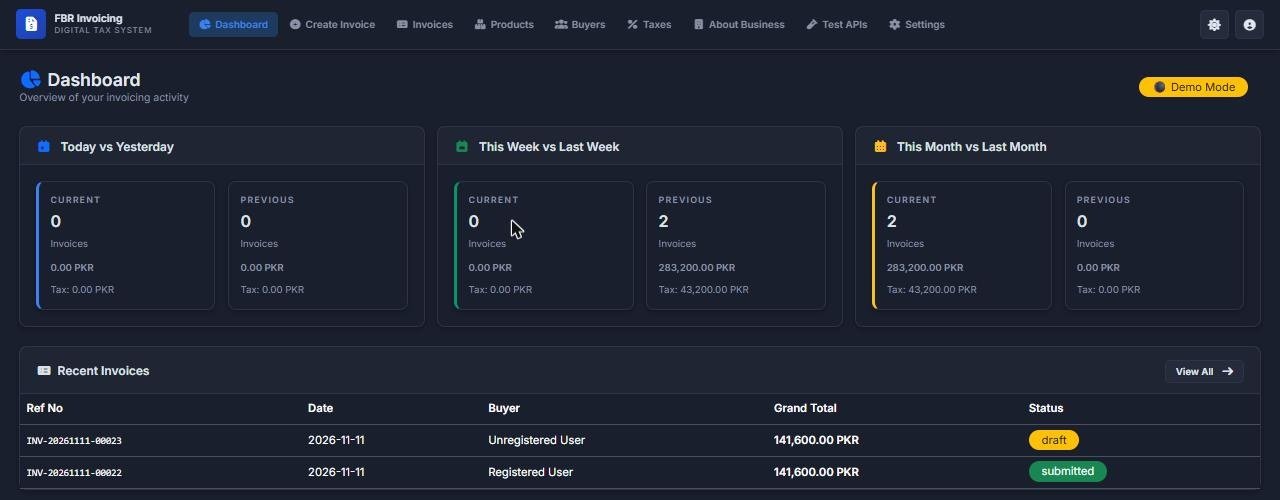
Smart Dashboard
Compare today, this week and this month against the previous period, with invoice counts, totals, tax and recent invoice status in one view.
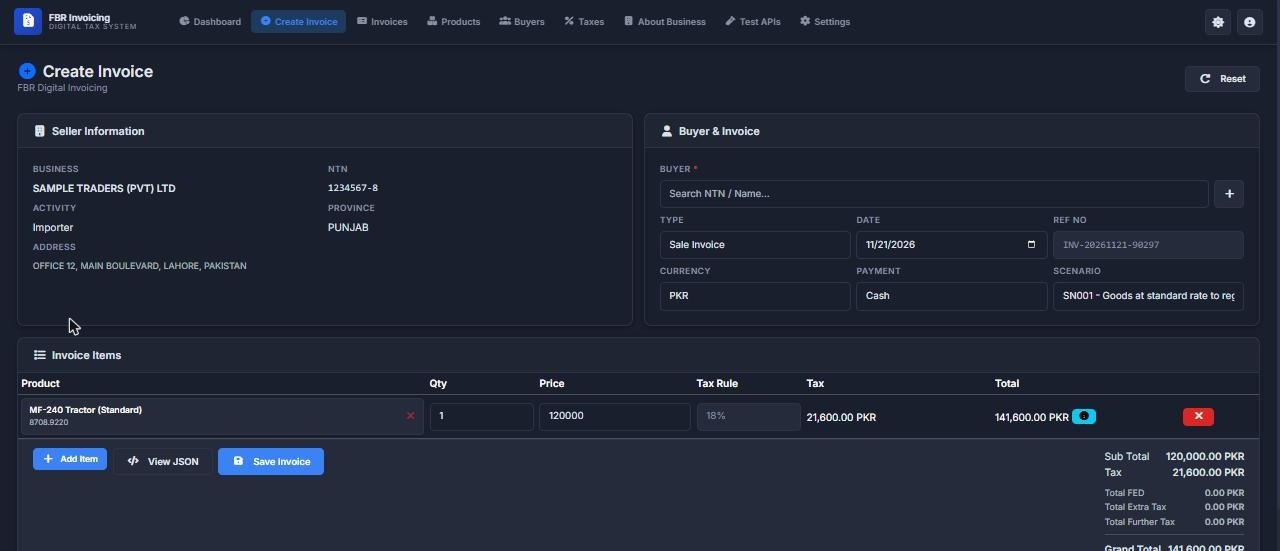
Create an invoice in seconds
Pick the buyer and product, enter the price and the software fills in the tax rate and totals automatically, by HS code and FBR scenario.
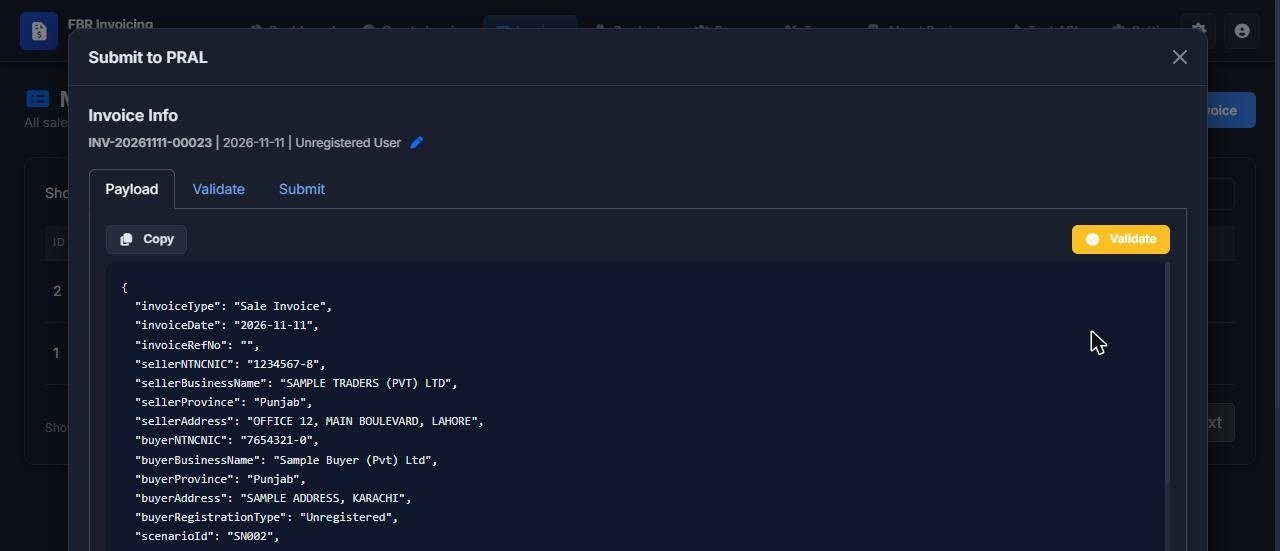
Prepare the FBR payload
The system builds the standardized JSON payload for FBR, ready to copy, validate and submit.
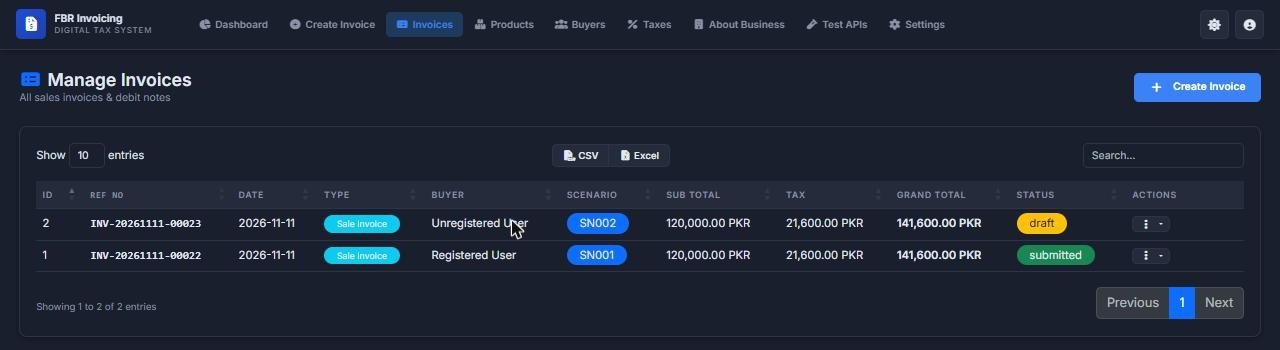
Manage every invoice
Track draft and submitted invoices, search them, and export to CSV or Excel.
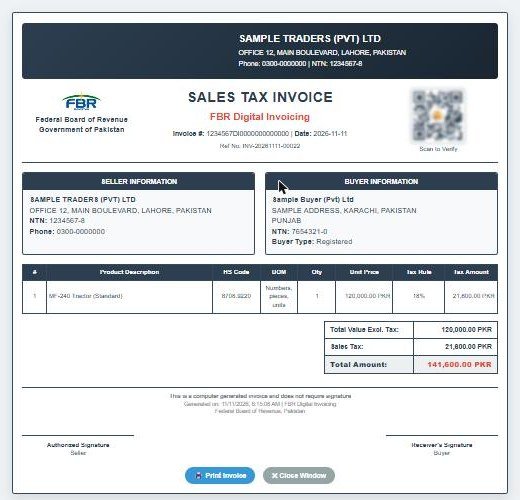
Printable FBR tax invoice
A professional sales tax invoice with seller and buyer details, tax breakdown, FBR invoice number and a QR code for instant verification.
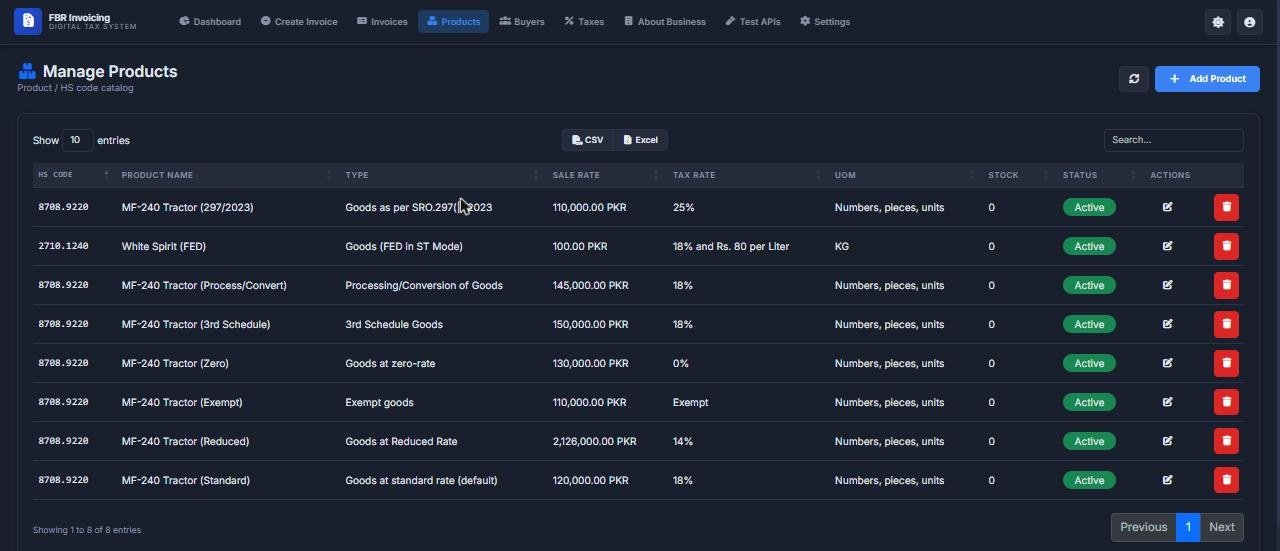
Products with HS codes and tax rates
Keep a catalogue of products with HS code, tax type, sale rate, tax rate and unit of measure for every FBR scenario.
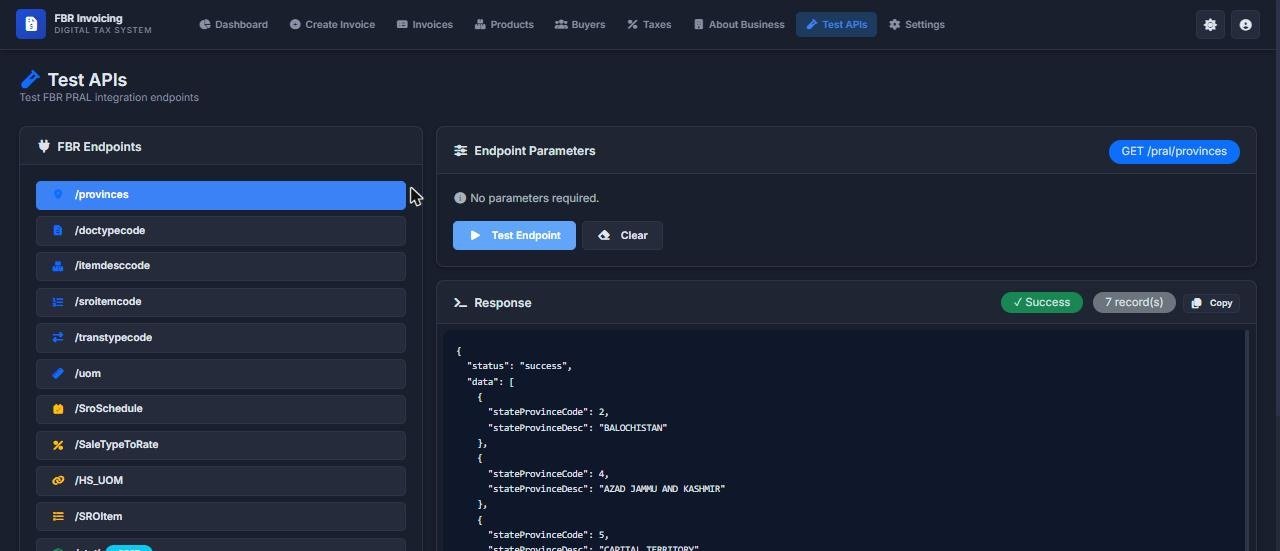
Live connection to FBR reference data
Test the FBR PRAL endpoints from inside the software, such as provinces, document types, units of measure and SRO schedules.
From invoice to FBR in three steps
Our software connects directly with Pakistan Revenue Automation Limited (PRAL), so you can validate and submit invoices instantly without leaving the dashboard. Watch the demo to see the whole workflow.
- 1Prepare the payload. The software turns your invoice into the standardized JSON that FBR expects.
- 2Validate with FBR. Errors are caught before submission, so a bad HS code or tax rate never reaches production.
- 3Submit and print. Submit through PRAL, receive the official FBR invoice number and print the invoice with its QR code.
Every module works together
Tax management, buyers, products, invoices and PRAL submission in one login, so compliance takes less time and leaves less room for error.
Smart Dashboard
Tax Rules Management
Buyer Management
Product Management
Invoice Management
Live PRAL Submission
Printable Invoices
FBR Reference Data
Software built by people who file FBR returns
Most vendors sell you software and leave the FBR paperwork to you. Our tax consultants and software team work side by side, so setup, testing and support come from one team.
Tax Experts Behind the Software
We know the sales tax rules the invoices have to follow, so tax rates, scenarios and HS codes are set up correctly from day one.
Validate Before You Submit
Every invoice can be checked against FBR before it is submitted, which keeps errors out of your official records.
One WhatsApp for Tax + Tech
A single number reaches both our tax team and our software team, with local support in Urdu and English.
How we get you live with FBR
A simple, guided process from first demo to your first submitted invoice.
- 1
Free Demo
We understand your business and show the software live.
- 2
Account Setup
We set up your seller profile and connect your FBR credentials.
- 3
Products & Tax Rules
We load your products with HS codes, units and tax rates.
- 4
Sandbox Testing
We run the required test scenarios in FBR's sandbox with you.
- 5
Go Live
You issue invoices; each one is validated and submitted to FBR.
Built for your kind of business
Whether you manufacture, trade, distribute or provide services, our cloud-based platform automates tax compliance and reduces manual work.
What is FBR Digital Invoicing?
FBR Digital Invoicing connects your invoicing system to the Federal Board of Revenue through PRAL. Each sales tax invoice is validated and submitted to FBR electronically, and comes back with an official FBR invoice number and QR code that anyone can use to verify it.
FBR has been extending digital invoicing to more sectors in phases. Not sure whether it applies to your business yet? Message us and we will check your category before you buy anything.
How an invoice flows
From your screen to FBR's system in a few clicks.
- You pick the buyer, products and FBR scenario
- The software applies the correct tax by HS code and rule
- A standardized JSON payload is prepared
- FBR validates the invoice before submission
- You submit through PRAL and receive the FBR invoice number
- The printed invoice carries the QR code for verification
Before you go live
The essentials we help you put in place.
- Active NTN and sales tax registration
- Your FBR integration credentials connected to the software
- HS code, unit and tax rate for every product you sell
- Required scenarios tested in FBR's sandbox
- Buyer registration details kept accurate
- A trained person who knows the draft, validate and submit steps