
EVOTRADE x TAXACCOUNTANT.PK

FBR Integrated POS Software in Pakistan

Sell, invoice and stay FBR-compliant with a POS that reports every sale to FBR in real time — with the FBR invoice number and QR code on every receipt. Built and integrated by FBR-registered tax consultants, so your software and your sales-tax compliance come from one trusted team.

✓ FBR Registered

✓ PSEB Registered Software House

✓ Real-Time Reporting

✓ QR Tax Invoices

Compliant with Sales Tax Act 1990 & Sales Tax Rules 2006 (Chapter XIV) · SRO 69(I)/2025 e-invoicing · PSEB Reg: Z-25-13291/25 · SECP CUIN: 0281278 · FBR NTN: F926074

What Is FBR POS Integration?

FBR POS integration connects your point-of-sale software directly to the Federal Board of Revenue’s computerised system. Every sale is transmitted to FBR in real time, and each receipt carries an FBR invoice number and a verifiable QR code under FBR’s POS invoicing and prize-scheme framework.

For Tier-1 retailers this integration is mandatory. Our FBR Integrated POS handles it end to end — the software, the STRN/sales-tax registration, the live integration, and your monthly sales-tax returns — so you stay compliant and penalty-free.

Who Must Integrate? (Tier-1 Retailers)

Why Choose Our FBR Integrated POS?

Most vendors sell you software and leave the FBR paperwork to you. We are FBR-registered tax consultants and a PSEB-registered software house — so you get both under one roof.

Software + Compliance, One Team

We build the POS and handle STRN registration, integration and returns — no juggling a coder and a tax agent.

Penalty Protection

We keep you correctly integrated so you avoid the Rs 1 million penalty, premises sealing and input-tax reduction.

One WhatsApp for Tax + Tech

A single number reaches both our tax team and our software team — fast, local support in Urdu and English.

Key Features of Our FBR Integrated POS Software

Everything you need to sell faster, control stock and stay compliant.

Real-Time FBR Reporting

Every invoice is transmitted live to FBR’s system automatically.

FBR Invoice No. + QR Code

Verifiable, verifiable tax invoices on every receipt.

Inventory & Stock Control

Real-time stock, multi-warehouse, variations and low-stock alerts.

Sales Reports & Analytics

Dashboards for top items, staff, branches and tax summaries.

Multi-User Roles

Cashier, manager and admin permissions with full accountability.

Cloud & Multi-Branch

Access anywhere, sync multiple outlets, automatic backups.

Easy to Learn

Clear screens and a built-in documentation page keep staff training minimal, with support in Urdu and English.

Payments & Accounts

Cash, card, split, cheque, gift card and deposit at the till, with Easypaisa and JazzCash accounts in your ledger.

See EvoPOS in Action

These are real screens from our live EvoPOS system at pos.evotrade.io, the same software we set up and connect to FBR for you. Seller, customer and token details are masked for privacy. Click any screen to see it full size.
Dashboard
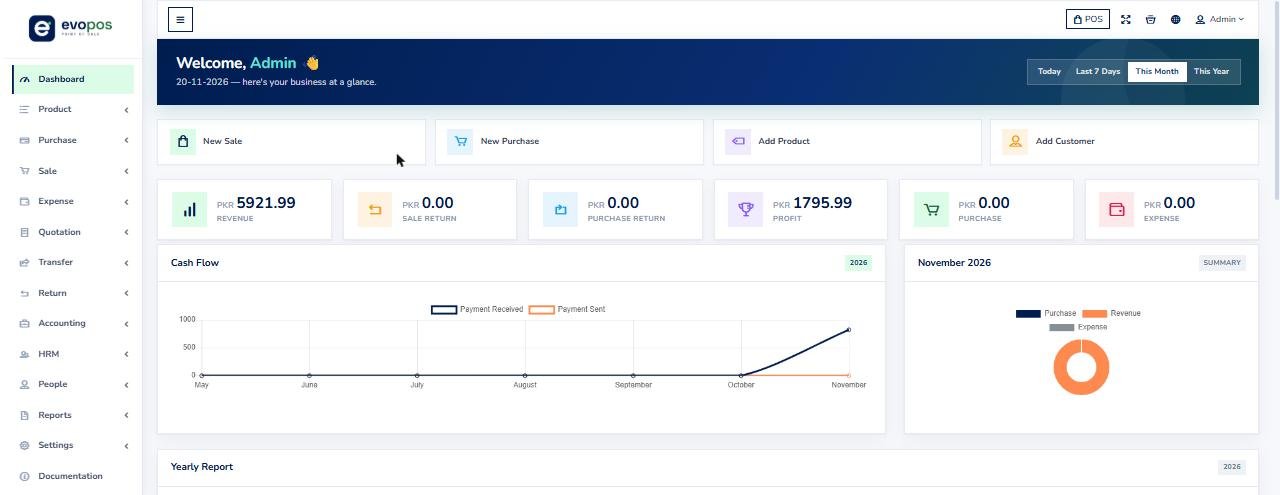
DashboardRevenue, sale and purchase returns, profit, purchase and expense at a glance, with quick actions for New Sale, New Purchase, Add Product and Add Customer.
POS billing screen
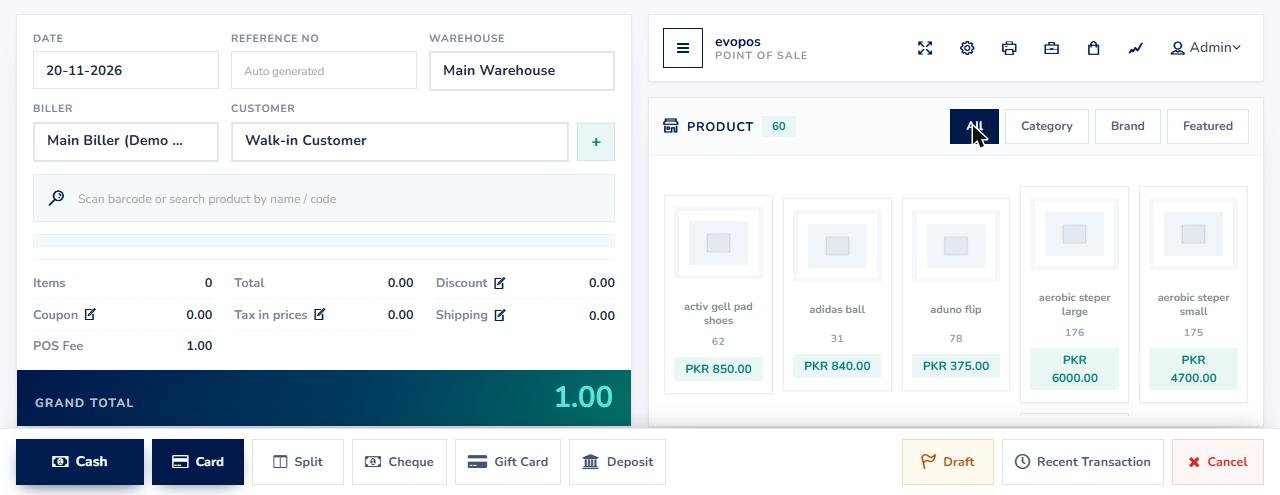
POS billing screenScan a barcode or search by name or code, pick a customer and biller, and take payment by Cash, Card, Split, Cheque, Gift Card or Deposit. Save a Draft or open Recent Transactions.
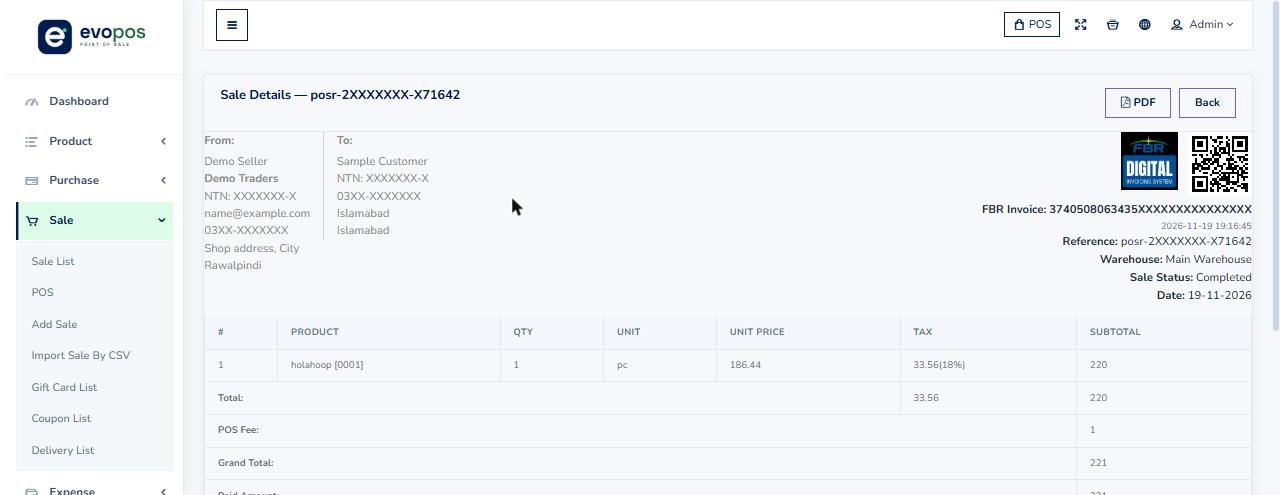
Sale invoice with FBR QR code
Sale invoice with FBR QR codeEvery finalized sale carries the FBR Digital Invoicing logo, a QR code and the FBR invoice number, with product HS code, unit and 18% tax shown per line. Customer and seller details are masked in this screenshot.
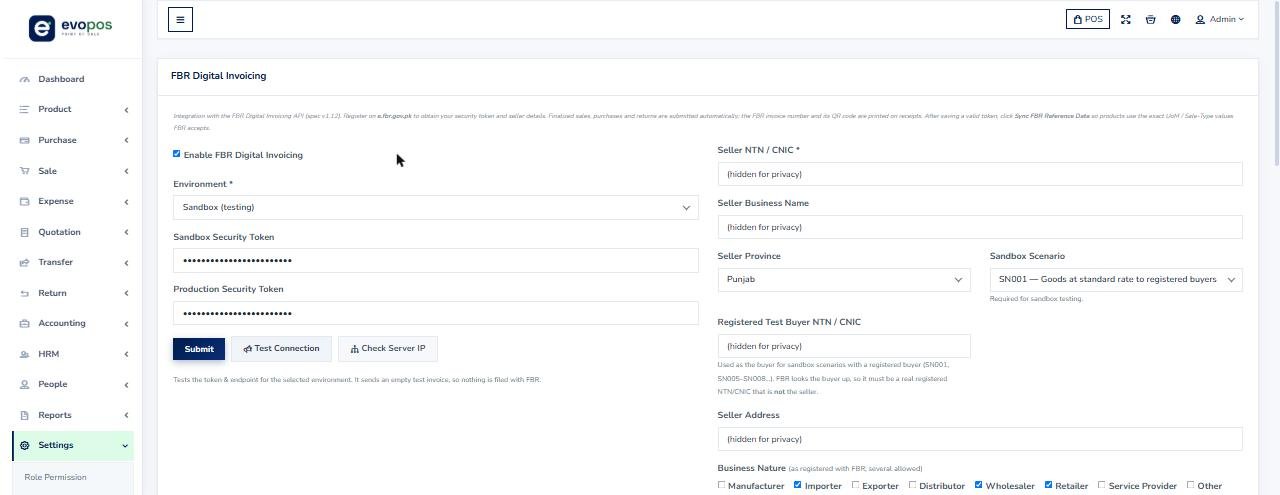
FBR Digital Invoicing settings
FBR Digital Invoicing settingsSwitch between Sandbox (testing) and Production (live), save your security token, set seller NTN/CNIC, province, business nature and sector, then Test Connection or Check Server IP. Token and seller details are masked.
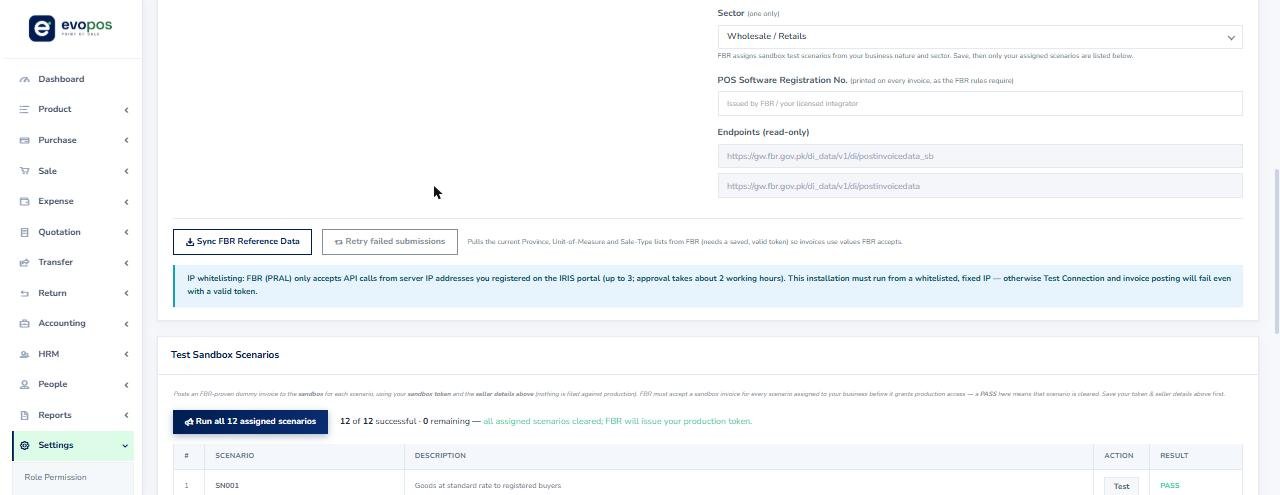
Sandbox scenarios, reference data and IP whitelisting
Sandbox scenarios, reference data and IP whitelistingSync FBR Reference Data for Province, Unit of Measure and Sale Type, retry failed submissions, and run every sandbox scenario FBR assigns to your business before production access.
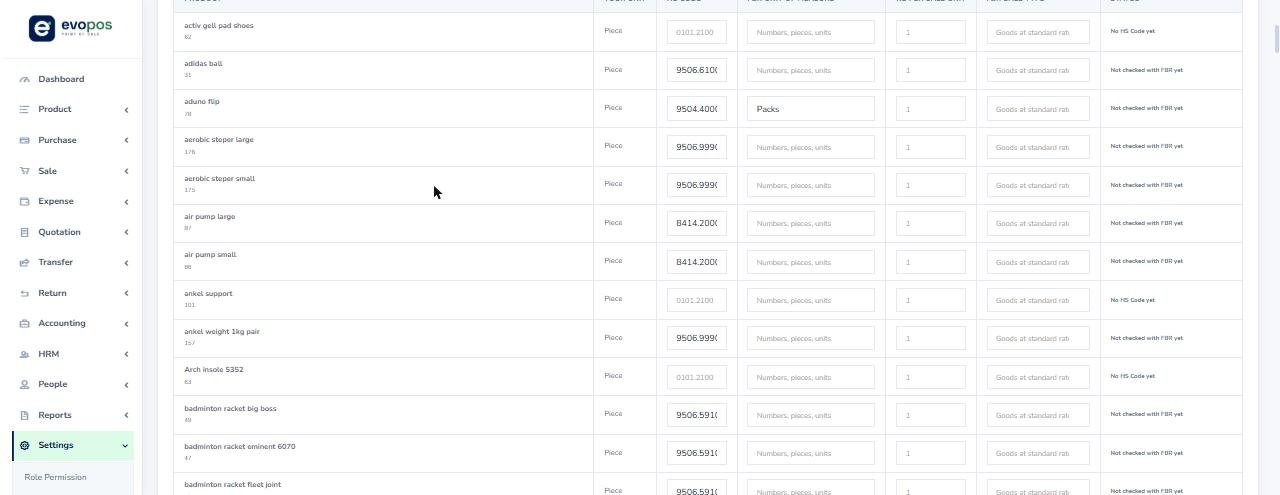
FBR Product Setup
FBR Product SetupOne table for every product: HS Code, the FBR unit of measure, quantity per sale unit and a status showing whether the product has been checked with FBR.
Add Product with FBR fields
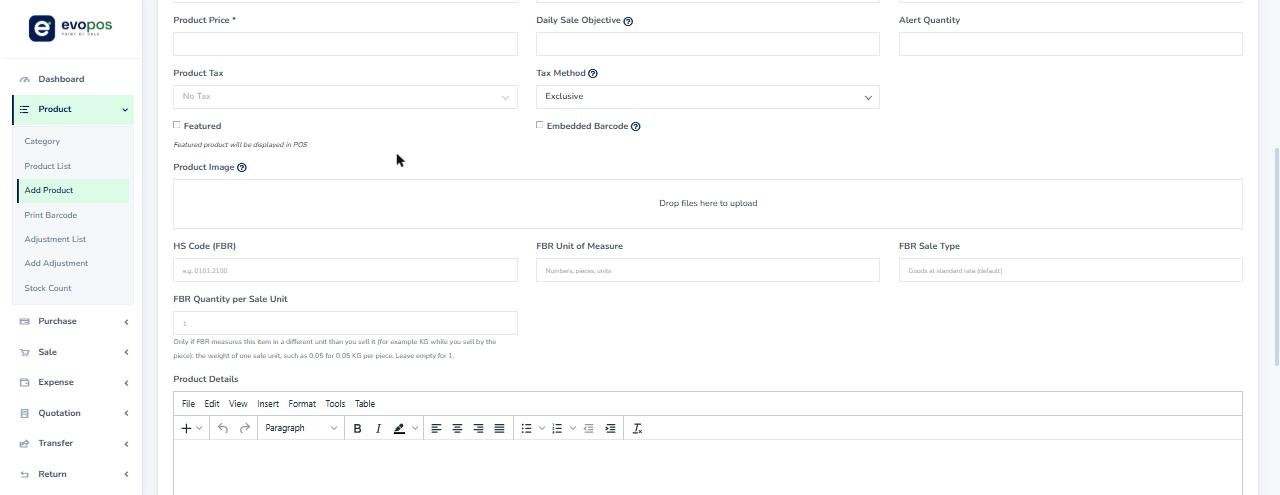
Add Product with FBR fieldsHS Code (FBR), FBR Unit of Measure, FBR Sale Type and FBR Quantity per Sale Unit sit right on the product form, with tax (GST 18%), barcode, variants, batch and expiry, and IMEI or serial numbers.
Sale list
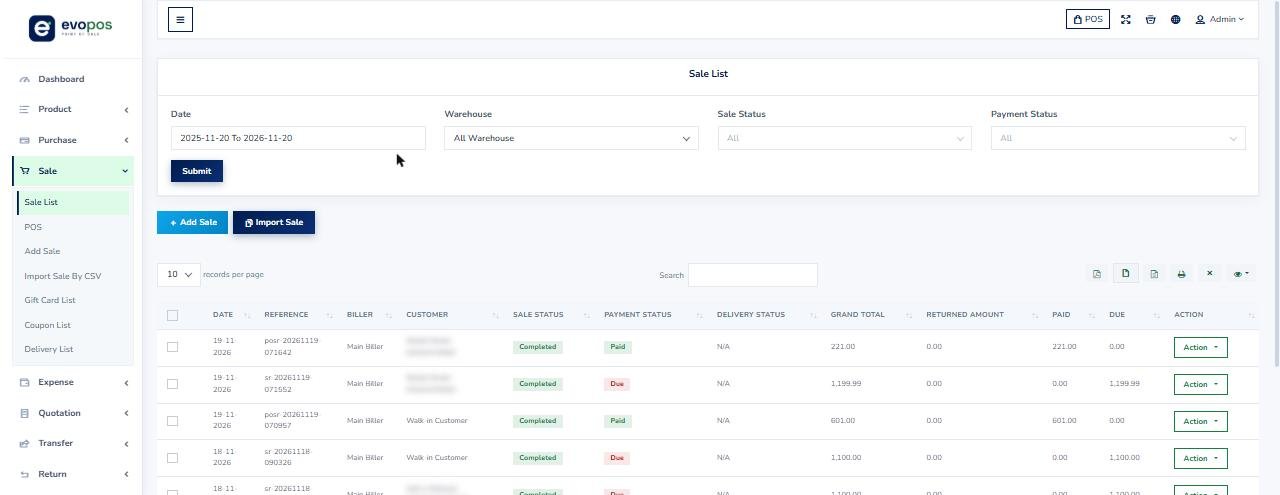
Sale listFilter by date, warehouse, sale status and payment status. See reference, customer, grand total, returned amount, paid and due for every sale, with Generate Invoice, View, Edit, View Payment, Add Payment and Add Delivery actions. Customer names are masked.
Add Purchase
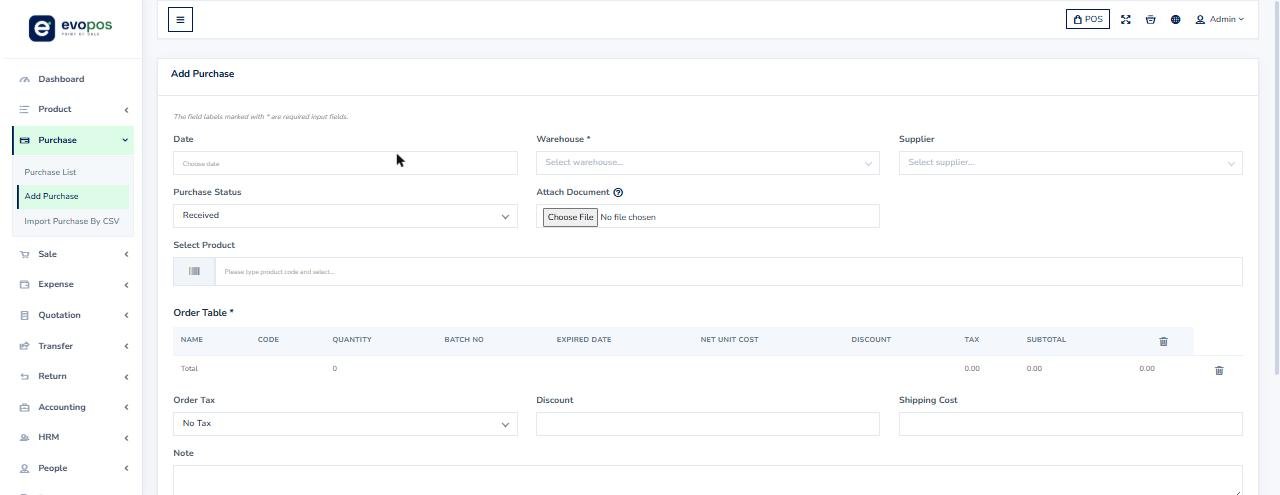
Add PurchaseReceive stock against a warehouse and supplier, with batch number and expiry date per line, tax, discount and shipping cost. Stock moves with every purchase.
Summary report
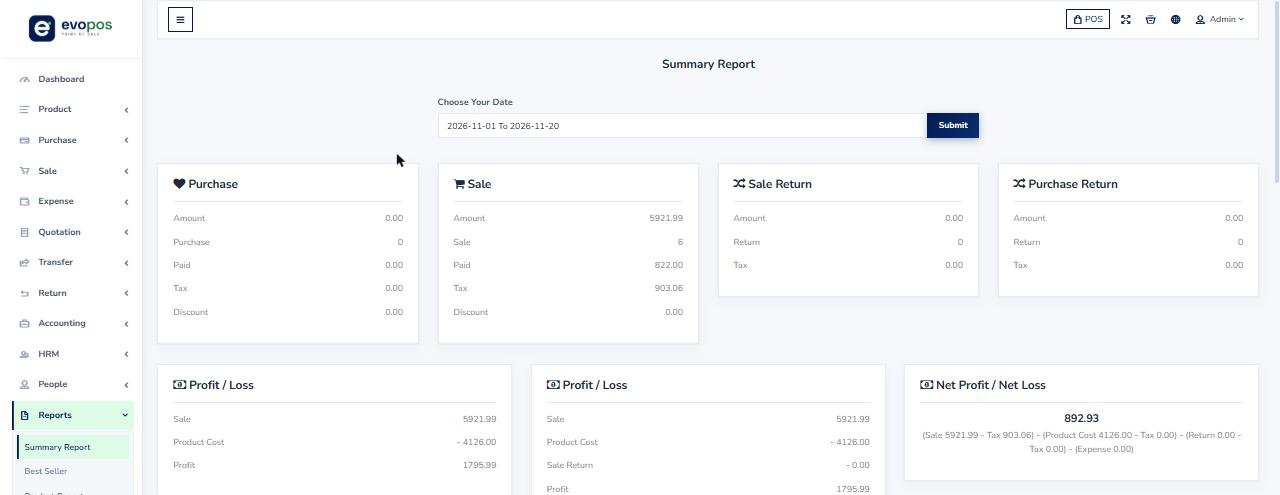
Summary reportPurchase, sale, sale return and purchase return totals, sales tax collected, profit and loss, net profit and payments received, for any date range.
Trial balance
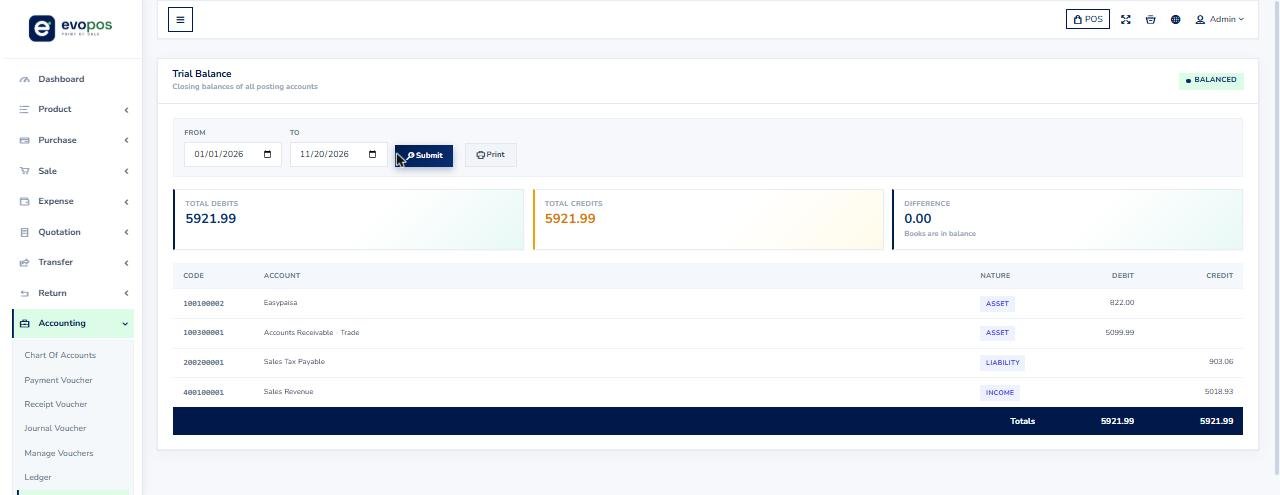
Trial balanceSales, payments, purchases, returns, expenses and payroll post to the general ledger automatically, so debits and credits stay in balance.

Everything Inside EvoPOS

EvoPOS is more than a till. Every menu below is part of the same system, so stock, sales, payments, accounts and tax stay connected.

Product

Category, Product List, Add Product, Print Barcode, Adjustment List, Add Adjustment, Stock Count

Purchase

Purchase List, Add Purchase, Import Purchase By CSV

Sale

Sale List, POS, Add Sale, Import Sale By CSV, Gift Card List, Coupon List, Delivery List

Expense

Expense Category, Expense List, Add Expense

Quotation

Quotation List, Add Quotation

Transfer

Transfer List, Add Transfer, Import Transfer By CSV

Return

Sale returns and Purchase returns

Accounting

Chart of Accounts, Payment, Receipt and Journal Vouchers, Ledger, Trial Balance, Profit & Loss, Balance Sheet, Cash Flow, Account List, Money Transfer, Account Statement

HRM

Department, Employee, Attendance, Payroll, Holiday

People

User List, Customer List, Biller List, Supplier List

Reports

Summary Report, Best Seller, Product Report, Daily and Monthly Sale, Daily and Monthly Purchase, Sale Report and chart, Payment Report, Purchase Report, Customer and Customer Due Report, Supplier Report, Warehouse Report and Stock Chart, Product Expiry, Product Quantity Alert, Daily Sale Objective, User Report

Settings

Role Permission, Discount Plan, Discount, Notifications, Warehouse, Customer Group, Brand, Unit, Currency, Tax, SMS, General Setting, Company Details, Reward Point, POS Settings, FBR Digital Invoicing, FBR Product Setup, Invoice Template, HRM Setting, Subscription & Billing, Documentation

Stock moves with purchases, sales, returns, adjustments, transfers and stock counts. Sales, purchases, payments, returns, expenses, payroll and transfers post to the general ledger automatically, and the accounting reports read from it. Seven invoice templates are included: Standard, Thermal Receipt (80 mm), Classic, Modern Blue, Minimal, Corporate Dark and Elegant Serif.

How FBR Digital Invoicing Works in EvoPOS

EvoPOS integrates with the FBR Digital Invoicing API (spec v1.12). This is the exact path the software takes you through.

  1. 1Register on e.fbr.gov.pk to get your security token and seller details.
  2. 2Open Settings, FBR Digital Invoicing, choose Sandbox or Production, and save your token, seller NTN/CNIC, province, business nature and sector.
  3. 3Click Test Connection. It sends an empty test invoice, so nothing is filed with FBR. Use Check Server IP to confirm the address FBR sees.
  4. 4Register your server IP on the IRIS portal. FBR (PRAL) accepts API calls only from the whitelisted IPs you register (up to 3, about 2 working hours for approval).
  5. 5Click Sync FBR Reference Data so products use the exact Province, Unit of Measure and Sale Type values FBR accepts.
  6. 6Run the sandbox scenarios FBR assigns from your business nature and sector. A PASS on every assigned scenario clears the way for your production token.
  7. 7Open FBR Product Setup and give every product its HS Code. Add the FBR unit and quantity per sale unit only where FBR measures the item differently from how you sell it.
  8. 8Sell as normal. Finalized sales, purchases and returns are submitted automatically, and the FBR invoice number and QR code print on the receipt. Failed submissions can be retried with one click.

Our team handles the registration, token, IP whitelisting, sandbox testing and HS code mapping with you, so you do not have to work through the FBR portal alone.

Book a Free Demo on WhatsAppCall +92 339 505 0983

Industries We Serve

FBR-compliant POS tailored to your business type across Pakistan.

Retail & General Stores

Restaurants & Cafes

Pharmacies & Medical Stores

Supermarkets & Karyana

Garments & Clothing

Auto Parts Shops

Wholesale & Distribution

Bakeries & Sweets

How We Get You FBR-Integrated

A simple, done-for-you process — software and compliance handled together.

1. Free Demo

We understand your business and show the POS live.

2. STRN Setup

We register or update your sales tax (STRN) if needed.

3. POS Setup

We install and configure the POS for your outlets.

4. FBR Integration

We connect to FBR and validate test invoices in the FBR sandbox.

5. Go Live + Returns

You start billing; we handle monthly sales-tax returns.

The Cost of Not Integrating

FBR enforces Tier-1 POS integration strictly. Staying non-compliant is expensive.

Rs 1 Million Penalty

A Tier-1 retailer that fails to integrate is liable to a Rs 1,000,000 penalty.

Premises Sealing

On continued failure, FBR may seal the business premises and halt sales.

Input Tax Reduction

Adjustable input tax can be reduced for non-integrated Tier-1 retailers.

Bypassing or under-reporting through the system can attract a penalty of up to Rs 500,000 or 200% of the tax involved, plus possible prosecution. We keep you correctly integrated so none of this applies to you.

Book Your Free FBR POS Demo

See the software live, get a compliance check for your business type, and receive a clear quote — free, with no obligation.

Request a Demo

Contact taxaccountant.pk Team

FBR Integrated POS — Frequently Asked Questions

Clear answers on FBR POS integration, requirements and penalties in Pakistan.

It is the process of connecting your point-of-sale software to FBR’s computerised system so every sale is reported in real time. Each receipt then carries an FBR invoice number and a QR code that customers can verify.

Tier-1 retailers must integrate – including units of national/international chains, shops in air-conditioned malls/plazas, businesses whose 12-month electricity bill exceeds Rs 1,200,000, wholesaler-cum-retailers, large retailers above the turnover threshold, and restaurants, bakeries and sweet shops serving the public.

A Tier-1 retailer that fails to integrate is liable to a Rs 1 million penalty and, on continued failure, sealing of premises. In addition, its adjustable input tax can be reduced. Bypassing the system can attract up to Rs 500,000 or 200% of the tax involved, plus possible prosecution.

FBR levies a service charge of Re 1 per invoice issued through an integrated POS, under SRO 1279(I)/2021. Our software handles this automatically.

Yes. As FBR-registered tax consultants we handle your STRN/sales-tax registration, the POS integration, and your monthly sales-tax returns – all from one team.

Yes. EvoPOS runs in the browser on a secure cloud, supports multiple warehouses, outlets and users with role permissions, and scheduled database backups. The screens are in English, and our team supports you in Urdu and English.

It depends on your setup, but once your STRN and POS are ready we typically complete integration and a validated test invoice within a few working days.

Retail and general stores, restaurants and cafes, pharmacies, supermarkets and karyana, garments, auto parts, wholesale/distribution, and bakeries – anywhere in Pakistan, 100% online.

Disclaimer: This page is general guidance based on the Sales Tax Act 1990 and Sales Tax Rules 2006 and does not constitute professional tax advice. Consult our FBR-registered team for your specific case.

Get FBR-Compliant Before FBR Comes to You

Book a free demo of our FBR Integrated POS software today — software, integration and sales-tax returns handled by one trusted team.

Price Breakdown

See exactly what you pay: our service fee, the official government fee, and the total.

ServiceOur service feeOfficial feeTotal
FBR Integrated POS Software (plus one-time setup)From Rs. 35,000Rs. 0From Rs. 35,000
100% recommend · 65 reviews on Facebook
See all reviews →

“FBR faceless assessment ka notice aaya tha audit ka, main darr gaya tha lekin in ki team ne saare documents sahi se present kiye, maza agaya in ki competency dekh kar.”

S
Simran Ali
👍 Recommends us on Facebook

“Apne boutique ka logo transfer karwana tha kisi ke naam par, inho ne legal documents taiyar kar ke transfer karwa diya, seamless experience!”

K
Khanzaadi Qüéêñ
👍 Recommends us on Facebook

“Gaari transfer karwani thi aur filer banna urgent تھا, inho ne urgent base par return file kar ke 24 ghante mein kaam kiya, speed ka koi muqabla nahi in ka.”

A
Abid Ansari
👍 Recommends us on Facebook

“Choti si karyana shop ke liye naya tax return file karna تھا, in ki Rs. 4,290 wali fee boht affordable lagi mujhe, sasta aur meyaar kaam kiya.”

I
Ibrahim
👍 Recommends us on Facebook