The process of filing a trademark application with IPO-Pakistan online requires having an account in their e-filing portal at apply.ipo.gov.pk. For trademarks that are not being filed on behalf of clients (in other words, your own trademark applications), the SELF registration is used rather than the REPRESENTATIVE registration preferred by advocates and Registered Trademark Agents (RTMAs). Let’s go through the process step by step.
Step 1: Accessing the Online Filing Portal
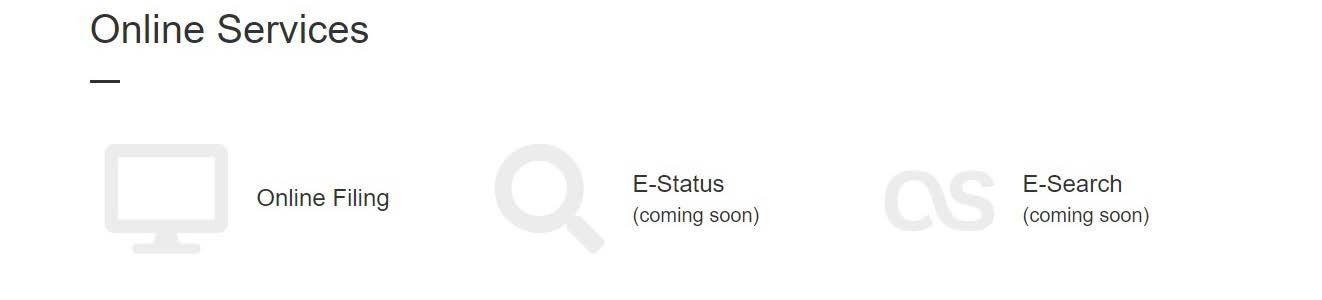
On the IPO-Pakistan homepage, click Online Filing under Online Services — or alternatively, go directly to apply.ipo.gov.pk. On the login screen, click New Registration.

Step 2: Verifying your Mobile Number and Email Address (Step-I)
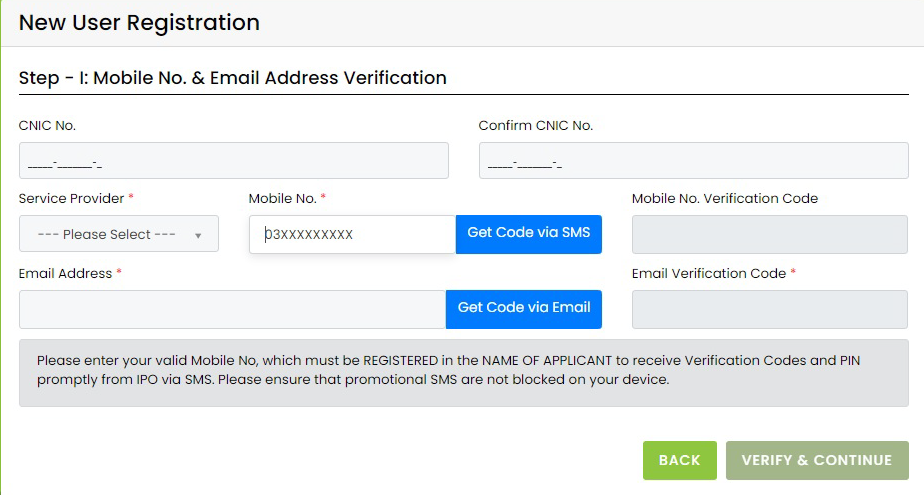
The registration data is collected in two steps. In Step-I, enter your CNIC number (and confirm it), select your mobile Service Provider, and enter your Mobile No. and Email Address. Only your own mobile number and email address should be used — once verified, they cannot be changed later.
Click Get Code via SMS to receive a verification code on your mobile and Get Code via Email for one that is sent to your email address. Enter the codes in the boxes below — each will display a confirmation message upon being verified. Once both are verified, the VERIFY & CONTINUE button turns green.
Step 3: Entering Details (Step-II)
Click VERIFY & CONTINUE to be taken to Step-II: Authorized Representative Detail. Your CNIC, Mobile No., and Email Address are carried forward from Step-I and cannot be changed further. Under “Register as,” select the SELF radio button, and then fill in:
- Title – if your name starts with Malik, Hafiz, Chaudhry, Syed, Qazi, Rana, Mian, Sheikh, Mirza, or similar, avoid selecting Mr/Ms/Dr/Prof and select the last option in the dropdown
- Full Name and Gender
- Landline Phone No. and Fax No. (both optional)
- Correspondence Address – your mailing address only. Do not add city, country, or phone number here; the corresponding fields have their own sections
- Province and City (the city list is populated based on the province selected)
This address will automatically be populated into the Correspondence Address field on your TM-1 form later, in the format Address, City, Province. Note that a SELF registration can only file your own applications; if you intend to file on behalf of clients, you will need to register as a REPRESENTATIVE instead.
Step 4: Agreement and Submission
Check the box to agree to IPO-Pakistan’s Terms & Conditions, enter the captcha characters as displayed in the image, and click SAVE & CONTINUE.
Step 5: Registration Successful
You will be shown a “Registration Successful” message confirming that your request was submitted, and an email is sent to your registered address containing further instructions.

What to Expect by Email
IPO-Pakistan will send a confirmation email from no-reply@ipo.gov.pk containing your Username (your CNIC), a Default Password assigned by the system, and a 4-digit PIN Code. Your Username and Password are used to log in to the online filing portal, while the PIN Code is used separately when submitting an application to IPO-Pakistan. It is recommended that you change the autogenerated password on your first login.
FAQ
What is the difference between SELF and REPRESENTATIVE registration?
SELF registration is reserved for applicants who are filing their own trademark applications. The REPRESENTATIVE registration, on the other hand, is used by advocates and Registered Trademark Agents (RTMAs) for filing applications on behalf of clients. In addition to the basic information, it requires verification of a law firm name, Bar Council license number, and a physical address verification letter sent by courier.
Can I change my registered mobile number or email address later?
No, once verified in Step-I, your mobile number and email address cannot be changed.
What if I do not receive my verification code?
Make sure that promotional SMS are not being blocked on your device, since the verification code is sent to you the same way. For queries about your registration, OTP, password, or PIN, you can contact feedback@ipo.gov.pk.
Do I need this account in order to just search the trademark register?
No, accounts are needed only for online filing of trademark applications. A physical request for a search can be submitted using Form TM-55, although online filing of such a request is also faster.
Once registered, consult our guide to registering a trademark in Pakistan for details on the filing process, including fees and timelines.
Filing on behalf of a client instead? Consult our guide to registering as a REPRESENTATIVE (Attorney/RTMA).
Would you prefer to avoid all the paperwork entirely? Our trademark registration service can assist you with the entire process.