
Claiming Input Tax on Imports Through Annex-B
If your business imports goods, the Sales Tax you paid at import stage is claimed as input tax through Annex-B of your Sales Tax Return – separate from Annex-A, which covers domestic purchases. Annex-B works off your Goods Declarations (GDs) rather than supplier invoices, since imported goods are cleared through Customs, not through a domestic seller relationship.
Step 1: Open Annex-B
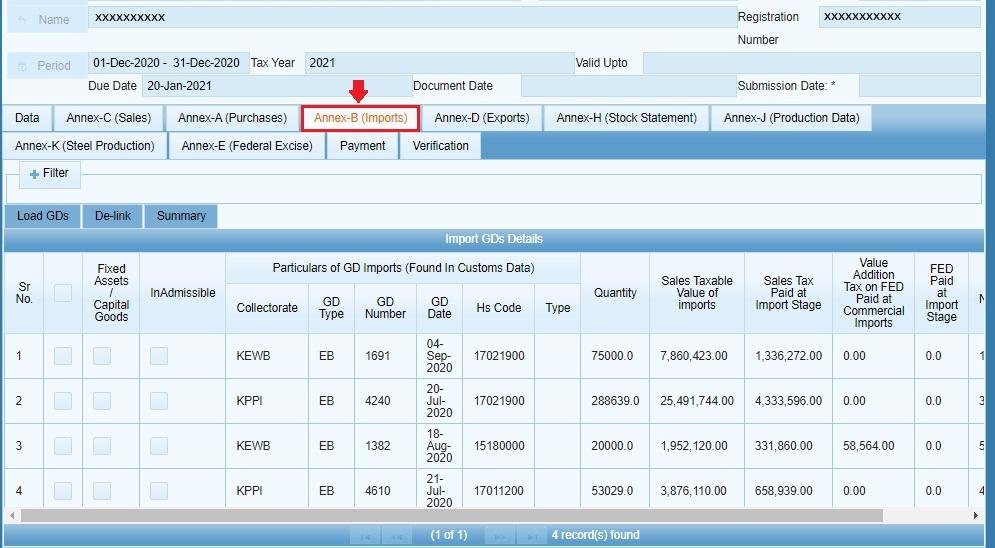
Inside your open Sales Tax Return, click the “Annex-B” tab next to Data and your other annexures. The Annex-B screen loads.
Step 2: Load Your Goods Declarations
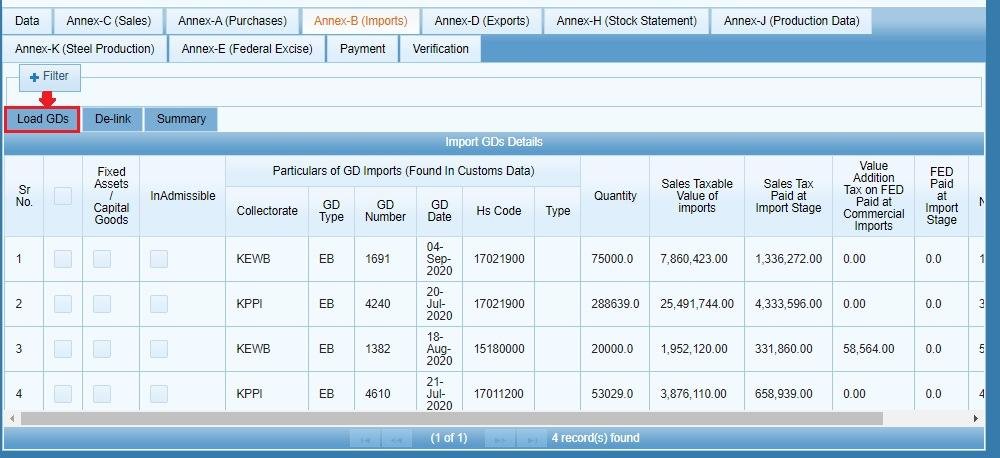
Click the “Load GD(s)” button. IRIS pulls in all your available Goods Declarations into a grid for the tax period. Two things worth knowing here:
- Only GDs relevant to the current return’s tax period appear in the list.
- Any GD already consumed in Annex-K (steel sector production) will not show up here – it’s excluded to prevent claiming the same import twice across different annexures.
Step 3: Select and Claim
Select the GD(s) you want to claim input tax against, then click the “Claim” button. IRIS confirms with “Invoice(s) claimed successfully,” and the claimed GDs become part of your Annex-B input tax figure, which feeds into your overall Sales Tax Credit on the Data tab.
Common Mistakes We See With Annex-B
- Expecting a GD to appear that’s already been used in Annex-K. If you’re in the steel sector and a GD isn’t showing up, check whether it’s already been consumed there rather than assuming a system error.
- Claiming import input tax under Annex-A by mistake. Annex-A is for domestic purchase invoices; imports go through Annex-B against GDs specifically, not invoices.
- Forgetting to recalculate Sales Tax Credit on the Data tab after claiming new GDs in Annex-B – the Credit figure won’t reflect the claim until you re-run Calculate.
FAQ
What’s the difference between Annex-A and Annex-B?
Annex-A covers input tax on domestic purchases via supplier invoices. Annex-B covers input tax on imports, claimed against your Goods Declarations instead.
Why isn’t my GD showing up in Annex-B?
It may already be consumed in Annex-K if you’re in the steel sector, or it may not fall within the tax period of the return you currently have open.
Do I need to do anything else after claiming a GD in Annex-B?
Go back to the Data tab and click Calculate on Sales Tax Credit so the claimed amount is reflected in your overall return figures.
For the full annexure breakdown, see our guide to Sales Tax annexures in IRIS, or the complete Sales Tax return filing guide.