Reporting Exports Through Annex-D
If your business has any exports, you will find reporting them in Annex-D of your Sales Tax Return. Exports are generally zero-rated for Sales Tax, but must still be declared which Annex-D collates from your export Goods Declarations (GDs) – the same customs documentation (import GDs) used for imports via Annex-B, but on the outbound side.
Steps:
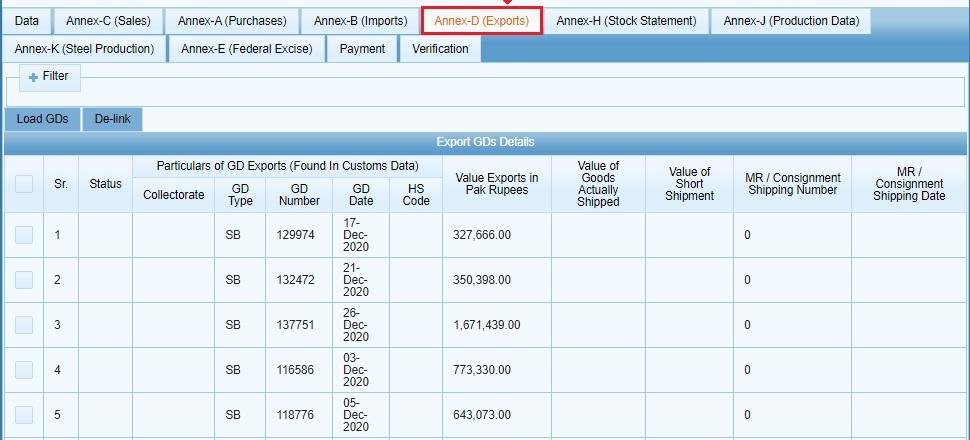
1. Open Annex-D
Within your open Sales Tax Return, click on the tab for “Annex-D”. You will be presented with the Annex-D screen, where you can load your export GDs.
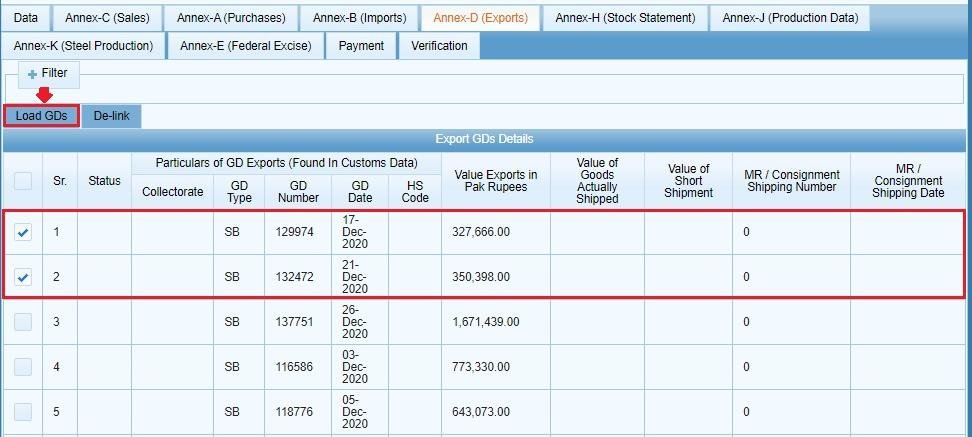
2. Load Your Export GDs
Clicking the “Load GD(s)” button will bring up the Goods Declarations for exports which fall within the tax period of the return you currently have open, displayed on the “Export GD(s) details” grid.
3. Review the Details
Compare the export GDs which have been loaded to those you have on file for the period – as the grid shows data which has been filed with Customs against your registration, this is a good opportunity to ensure that the data is correct before proceeding to finalise your return for submission, as it represents the data which will be submitted via Annex-D.
If You Don’t Export
Not all businesses registered for Sales Tax will necessarily need Annex-D, as those with no exports over the tax period will not have any data to load or submit.
Common Mistakes We Notice With Annex-D
- Assuming that exports are exempt from Sales Tax and therefore do not need to be reported. Exports are zero-rated, not exempt, and must still be declared in Annex-D.
- Not double checking that the loaded export GDs match those which you have on file for the period. Should a GD not appear, or the figures be incorrect, it is advisable to confirm this with your Customs records prior to submission of the return.
- Mixing up Annex-B and Annex-D. While similar in that they work with GDs, Annex-B is concerned with import input tax, and Annex-D with reporting your own exports.
FAQ
Do I pay Sales Tax on exports?
Exports are generally zero-rated (have a zero Sales Tax rate applied), but must still be declared through Annex-D if applicable.
Do I need to fill in Annex-D if I don’t have any exports for a tax period?
Annex-D is simply omitted for tax periods where no exports took place.
Where does the data in Annex-D come from?
The data in Annex-D is taken from your export Goods Declarations (GDs).
For the full annexure breakdown, see our guide to Sales Tax annexures in IRIS, or the complete Sales Tax return filing guide.