What the Unreconciled Amount is for
If you are submitting a Wealth Statement as part of your IRIS return, you may notice an “Unreconciled Amount” field on the Reconciliation of Net Assets screen.
This field appears when your declared inflows, outflows, assets, and liabilities for the year do not reconcile with each other. You may not submit a Wealth Statement with an unreconciled amount of anything other than 0, since the system will not allow a Wealth Statement to be submitted with an unreconciled amount.
In other words, your net assets (net worth) should be equal to your beginning net assets plus your inflows, less your outflows for the year. If they are not equal, the system will prompt you to reconcile the difference.
For a general step-by-step overview of filing an income tax return online via IRIS, see our step-by-step income tax return guide.
Step 1: Make Sure All Assets and Liabilities are Declared
Before reconciling, double check that you have declared all assets and liabilities in your Personal Assets/Liabilities (14.2) section, including immoveable property, movable property, capital in AOPs/companies, and payables (loans, borrowings, credit balances), etc. If you missed declaring an asset or a liability, that would explain a discrepancy in the year-over-year reconciliation figures.
Step 2: Check Reconciliation of Net Assets Section for Entries that Require Your Inputs
The reconciliation of net assets section derives some information from other sections of your return automatically, but also has some fields that require you to input information if applicable:
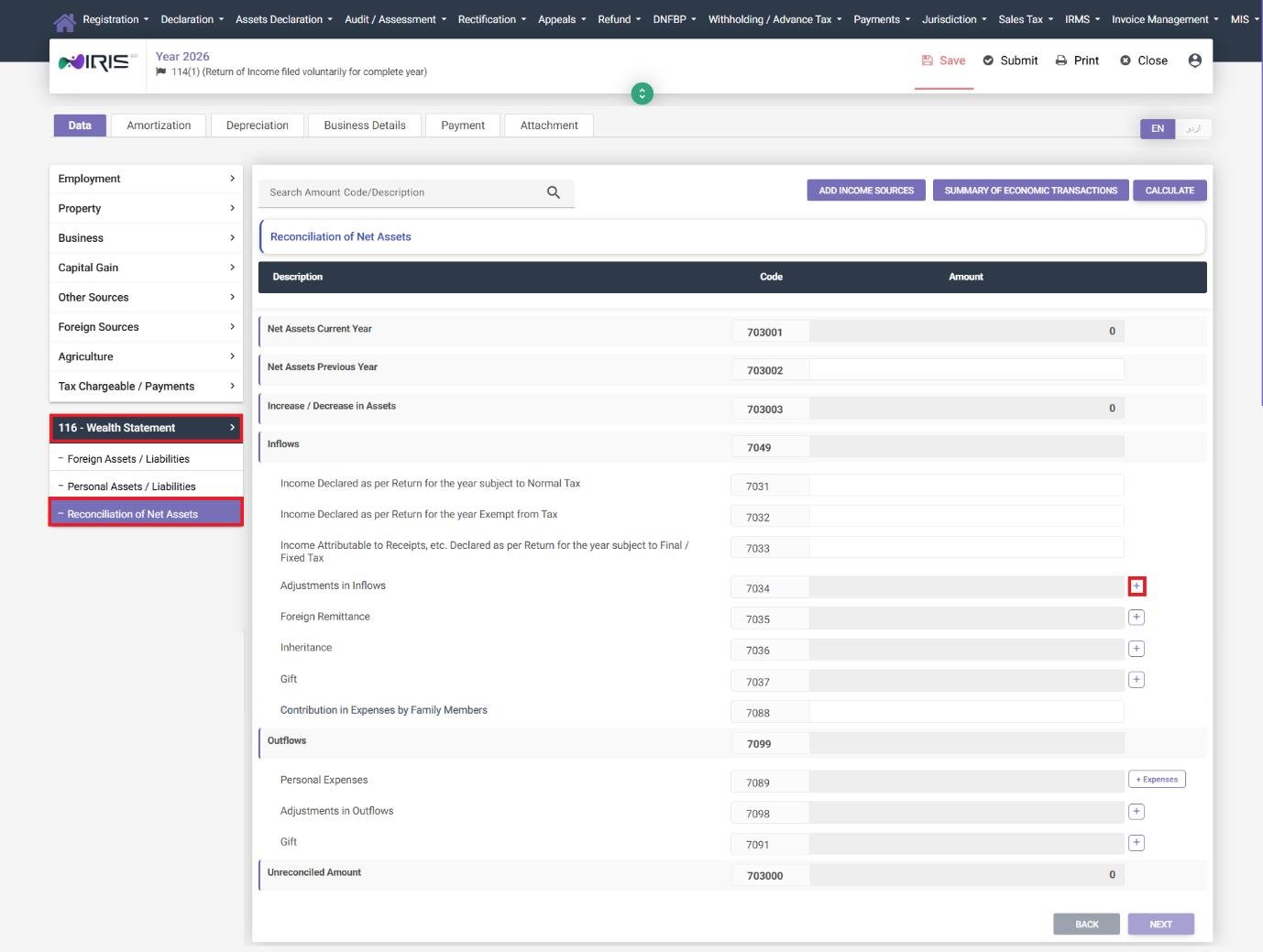
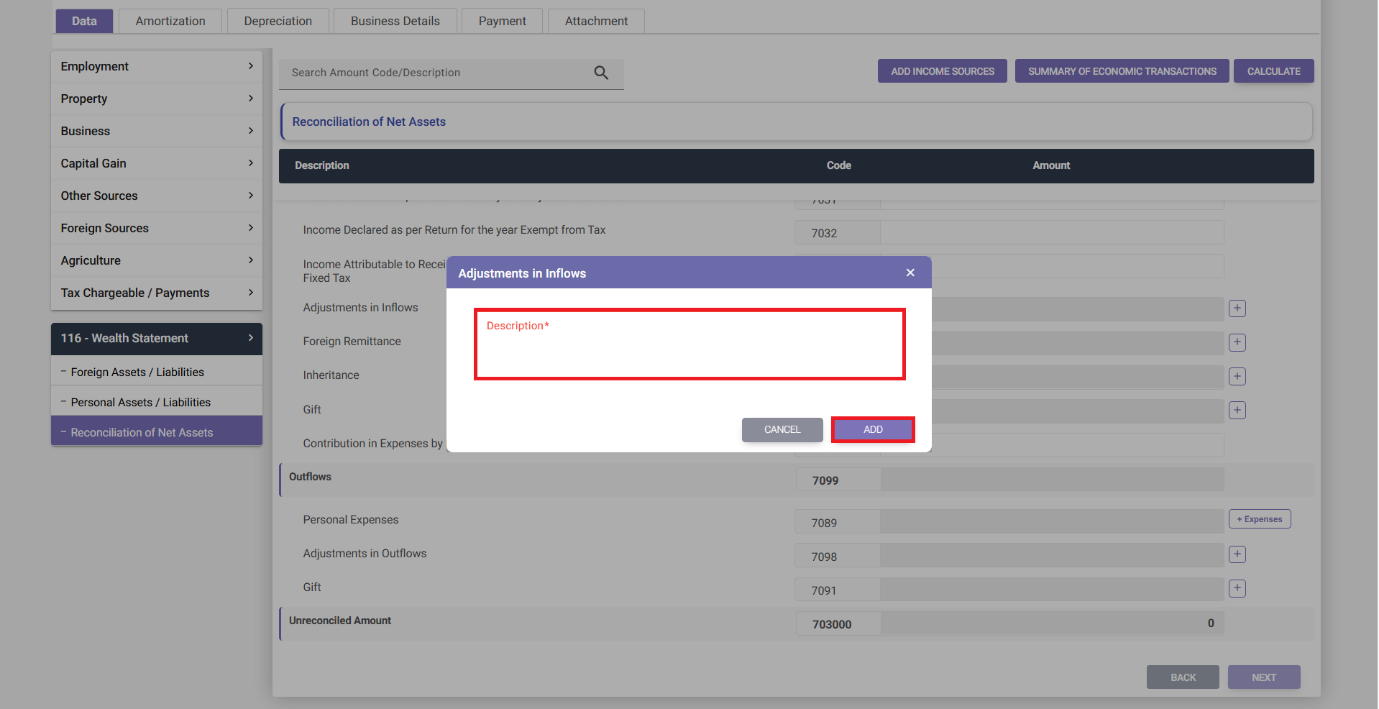
- Adjustment in Inflow – click the + icon to add a description of the adjustment in inflow and click Add.
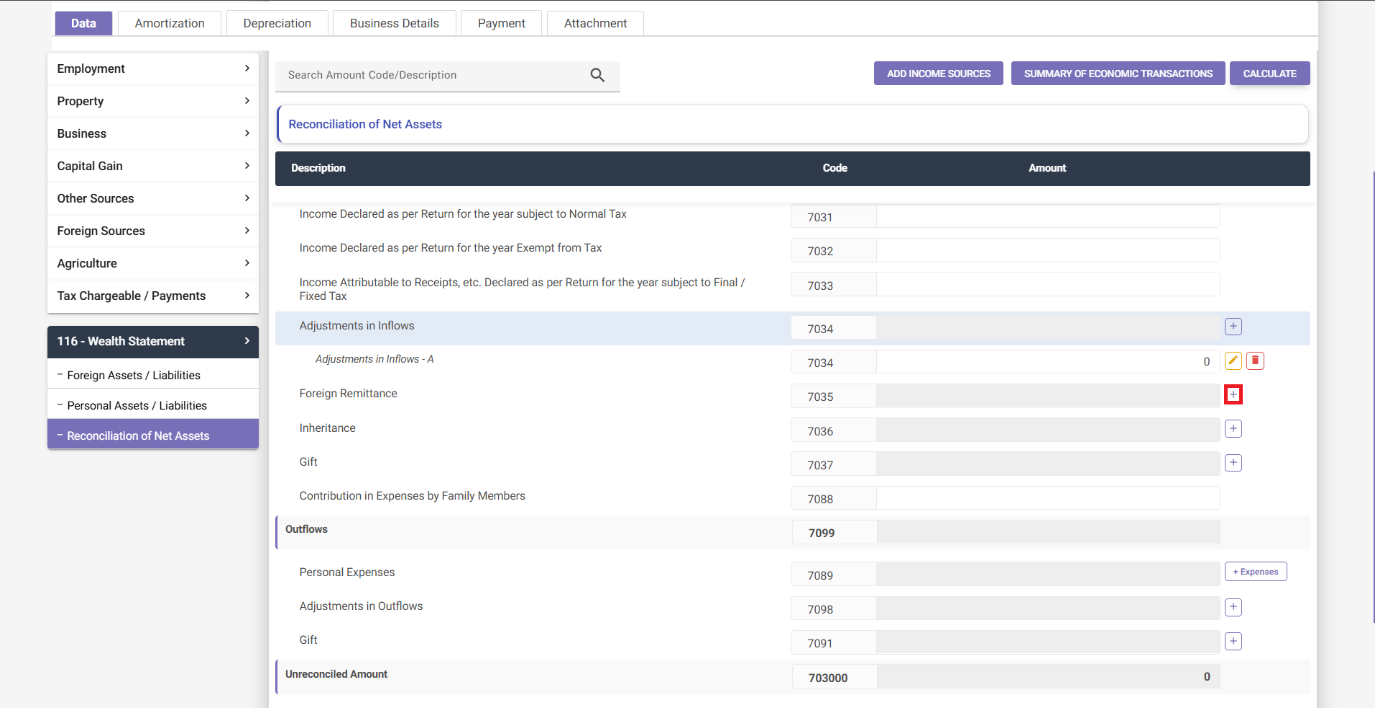
- Foreign Remittance – click the + icon and enter the foreign remittance amount.
- Inheritance – click the + icon, enter the Registration No./CNIC/POC/Passport (7-13 alphanumeric characters) of the person giving you the inheritance and click Save.
- Gift Received – click the + icon, enter the Registration No./CNIC/POC/Passport (7-13 alphanumeric characters) of the person giving you the gift, and click Save.
- Personal Expenses – click + Expenses, select an applicable expense category from the dropdown, and click Add. This field refers to your outflows for personal expenses for the year.
- Adjustment in Outflow – click the + icon, add a description of the adjustment in outflow, and click Save.
After entering your adjustments, click Calculate to view the updated Unreconciled amount.
Step 3: Track Down the Discrepancy
If your Unreconciled amount is not zero, even after Step 2, it is almost certainly due to one of the following reasons:
- Your Personal Expenses were not declared or were under-declared. Everybody has expenses for personal living costs during the year, such as rent, electricity, food, and transport. If this field is left blank or not high enough, it will cause a discrepancy in the reconciliation, as the system has no other way to account for the expenditure.
- An asset increased in value during the year but was not declared as such. If, for example, the value of your bank account balance, property, or investment increased, make sure you have declared a corresponding salary, business income or other inflow of funds. If not, this will cause a discrepancy.
- A gift or an inheritance was received, but the details of the giver or relative were not entered correctly. Gifts and inheritances received require you to enter the Registration No., CNIC, POC, or Passport number of the giver or relative (7-13 alphanumeric characters). If this information was not entered correctly, it may not be appearing in the reconciliation as an inflow.
- A property was sold, gifted out, or disposed of, but was not declared as Sold/Exchanged in the Personal Assets/Liabilities section, leaving the discrepancy unaccounted for in the Wealth Statement. The property should be removed from your declared assets with the relevant disposal information.
Make sure to click Calculate after making any changes, since the Unreconciled amount may not update automatically.
Common reconciliation mistakes we see
- Underreporting personal or household expenses. This is the single most common reconciliation issue, as people tend to underestimate or skip this field entirely, thinking of it as a balancing figure for the rest of the Wealth Statement.
- Forgetting about foreign remittances received during the year. Especially for people who receive informal remittances from abroad, it may be easy to forget to declare them.
- Failing to update the Wealth Statement when a property is sold. A property that has been sold should be marked as Sold/Exchanged with the relevant disposal details in the Personal Assets/Liabilities section, not just removed from the list of assets.
The Unreconciled amount field is not a minor detail to be overlooked – it is a prompt to investigate if there is a real discrepancy between the declared inflows, outflows, assets, and liabilities, and to update the relevant figures.
FAQ
Why is there an unreconciled amount?
There is an unreconciled amount when the declared inflows, outflows, assets, and liabilities for the year do not reconcile with each other.
What should the unreconciled amount be when submitting?
The unreconciled amount should be 0 when submitting, since the system will not accept a Wealth Statement for processing with a non-zero unreconciled amount.
Do I have to submit a Wealth Statement?
It depends on whether you are a resident or a non-resident. If you are a non-resident taxpayer and do not wish to submit a Wealth Statement, an Immoveable Property tab will appear instead. Submitting a Wealth Statement is mandatory for non-residents who are members of an AOP in Pakistan.