When You Need a Revised Return
A Revised Return is used to correct or update a return that has been submitted already. This is separate to your Voluntary Return, which is your initial return for a tax period that you are filing for the first time. If you notice an error after submitting your return – a missed source of income, an incorrect figure, a forgotten deduction – you don’t need to contact FBR directly; you may file a revised tax return yourself via IRIS, subject to applicable tax law timelines governing when a revision may be filed.
If you are filing your income tax return for the first time, see our step-by-step guide to filing your income tax return online.
Step 1: Initiate the Revision
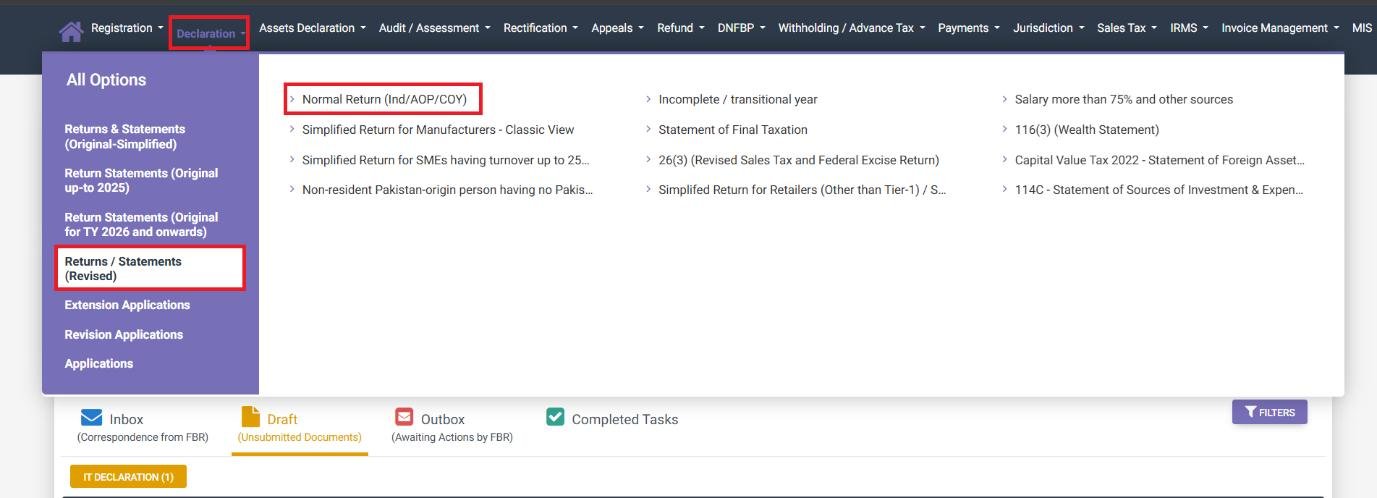
From the IRIS Dashboard, click on the Declaration drop-down and select ‘Return / Statement Revised’ and click “Normal Return (Ind/AOP/COY).”
Step 2: Select the Tax Period
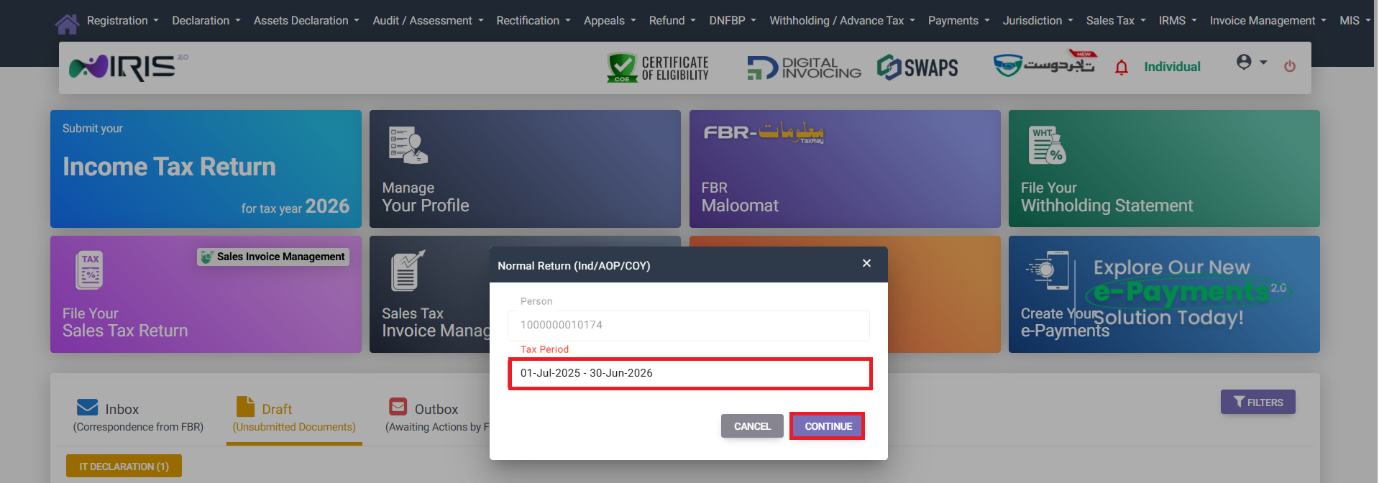
On pop up prompt request the Tax Period, which should be the tax period you are revising, and click Continue – This will bring you to the interface for your revised return.
Step 3: Update Relevant Information and Resubmit
From here the process is similar to that of filing your original return – work through the relevant income modules to make any corrections and resubmit your return following the standard return filing procedure (selection of relevant income sources, completing each respective module, checking your Tax Chargeable/Payments computation, reconciling your Wealth Statement if applicable, and submitting). Where appropriate take care to ensure that any downstream figures (such as a Wealth Statement reconciliation) that relied on the original figure do not need to be updated in turn.
Common mistakes we see in relation to Revised Returns
- Assuming that a revision alters the entire return – take care to review all sections of any revised return, not just the single field or module known to be incorrect, as a downstream figure (such as a reconciliation in your Wealth Statement) which relies on it may also need to be adjusted.
- Not checking whether a revision is permissible for a given year – revisions are subject to applicable tax law timelines, and if you are unsure about whether you are still within the window to file a revised return, double-check before initiating the process.
- Re-declaring sources of income that were not erroneous in the first place, potentially creating inconsistencies with values that were correct in the original filing.
FAQ
May I submit a revised return after having filed?
Yes – see the Return / Statement Revised option in the Declaration menu, subject to applicable tax law timelines.
What is the difference between a Voluntary Return and a Revised Return?
A Voluntary Return is your original return which you submit for a tax period which you are filing for the first time. A Revised Return is filed at a later date to amend information in a previously submitted return.
When amending a return, do I need to re-enter all of my information?
No – the information that you have filed previously will carry forward into the revised return, with you editing specific sections where applicable and resubmitting.