
If you are required to file a Wealth Statement alongside your income tax return – which most individual filers are – you will enter the information through a “116(2) (Statement of Assets/Liabilities filed voluntarily)” wizard in the IRIS system. This guides you through the entry screens you would encounter: what to report under each category of assets and liabilities, and where each field is found.
If your Unreconciled Amount doesn’t reach zero after completing your entries, consult our troubleshooting guide for correcting an Unreconciled Amount in your IRIS Wealth Statement. To get an overview of your entire return, visit our step-by-step guide to filing your income tax return online.
Step 1: Open Your Wealth Statement
On the Data tab you’ll find the 116(2) form open with two tabs: Data and Verification. On the Data tab, on the left-hand pane, you’ll see the “Personal Assets / Liabilities / Receipts / Expenses” – this is where all of your entries will be made. You can click calculate to calculate your values at any time.
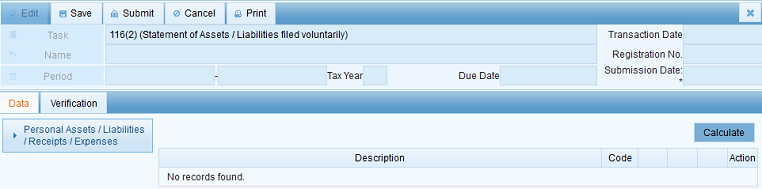
Step 2: Understand the Three Sections
Click the tab for Verification and see how the statement is organized under “Personal Assets / Liabilities / Receipts / Expenses”:
- Personal Expenses – what you spent in the year
- Personal Assets / Liabilities – what you owned as of the tax year end
- Reconciliation of Net Assets – where IRIS checks that your numbers balance (consult our separate guide if this shows an Unreconciled Amount)
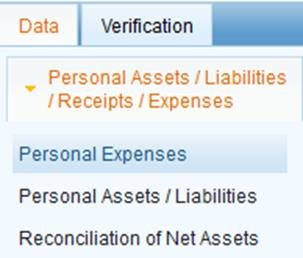
Step 3: Add Immoveable Property
Under Personal Assets/Liabilities click the + icon next to Property. Provide the Type and Form, full Address (Unit No., Complex/Street/Block, Area/Locality, searchable by Union Council), Land Area and Covered Area with Measurement Unit, and the Acquisition Date. Click OK to save.
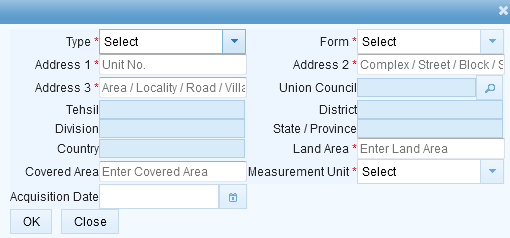
Step 4: Add Financial Assets and Investments
Click + next to Financial Assets & Investments and provide the Type and Form (savings account, mutual fund units, shares etc.), Account/Instrument Number (16-digit or IBAN, where applicable), the Institution (searchable), Currency, and the Opening/Acquisition Date.
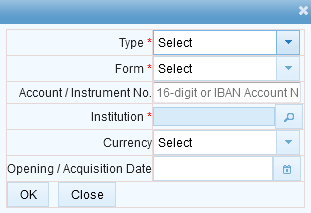
Step 5: Add Motor Vehicles
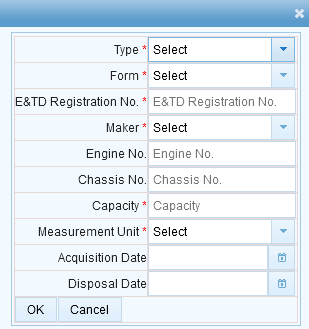
Click + next to Motor Vehicle and provide the Type, Form, Excise & Taxation Department Registration No., Maker, and optionally the Engine No., Chassis No., and Capacity. Add the Acquisition Date and, if you’ve sold it, a Disposal Date.
Step 6: Add Liabilities and Payables
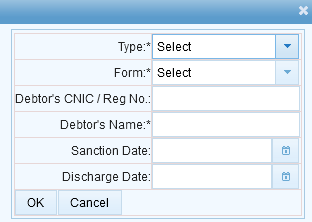
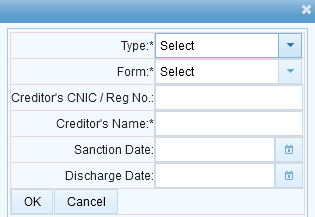
Any loan, borrowing, or amount that you owe goes under Liabilities. Click + and provide the Type, Form, the Creditor’s CNIC/Registration No. and Name, and the Sanction Date – and, once it has been settled, the Discharge Date. The Payables section (money that you owe that is not a formal loan) follows the same pattern with a Debtor’s or Creditor’s details depending on direction.
Step 7: Calculate and Check Reconciliation
After you have added every asset, liability and expense for the year, click Calculate. Switch to the Reconciliation of Net Assets tab to make sure the Unreconciled Amount is 0 – IRIS will not allow you to file a Wealth Statement that has a value of Unreconciled Amount that is non-zero. If it is not zero, go through our Unreconciled Amount troubleshooting guide before filing.
Common Mistakes We See With Wealth Statements
- Only declaring assets, not personal expenses. The IRIS reconciles your year-over-year net worth against what you earned and what you spent – one of the most common causes for a non-zero Unreconciled Amount is to leave out your personal expenses.
- Forgetting to add a Disposal Date on a sold asset. A vehicle or property that you no longer own but never marked as disposed will continue to show up in your assets and throw off next year’s comparison too.
- Mixing up Liabilities and Payables. Liabilities are typically a formal loan/borrowing with a Sanction Date; Payables cover other amounts that you owe. Using the wrong section can misstate your net worth even if the number itself is correct.
- Not updating jointly held asset shares. If your % ownership in a property or account changed during the year, the wealth statement requires that the new ownership be reflected – not just the initial acquisition record.
FAQ
Who is required to file a Wealth Statement?
Most individual income tax filers in Pakistan are required to file one under Section 116 of the Income Tax Ordinance – consult the Return Prerequisites screen when you start your return, which will let you know whether it’s required for your situation.
Do I need to declare assets held jointly with family members?
Yes, using your actual % Share in that asset – this is a field on each asset type’s add form, so IRIS knows only your percentage counts towards your own net worth.
What if I have no assets or liabilities to declare?
You still need to submit the statement showing your Personal Expenses for the year, even if the assets and liabilities sections are genuinely empty.
Not confident that your numbers are correct? Our income tax return filing service includes wealth statement preparation and reconciliation. You can file it directly through the official FBR IRIS portal.
Continue Your Income Tax Filing Guide
To prepare your figures, use our free basic wealth statement builder.